
Spanish Language is now Live on IHC
We are pleased to announce the addition of the Spanish language option to our platform. This feature is intended to make our resources more accessible to the user who prefer spanish as the first language and is now available to use .
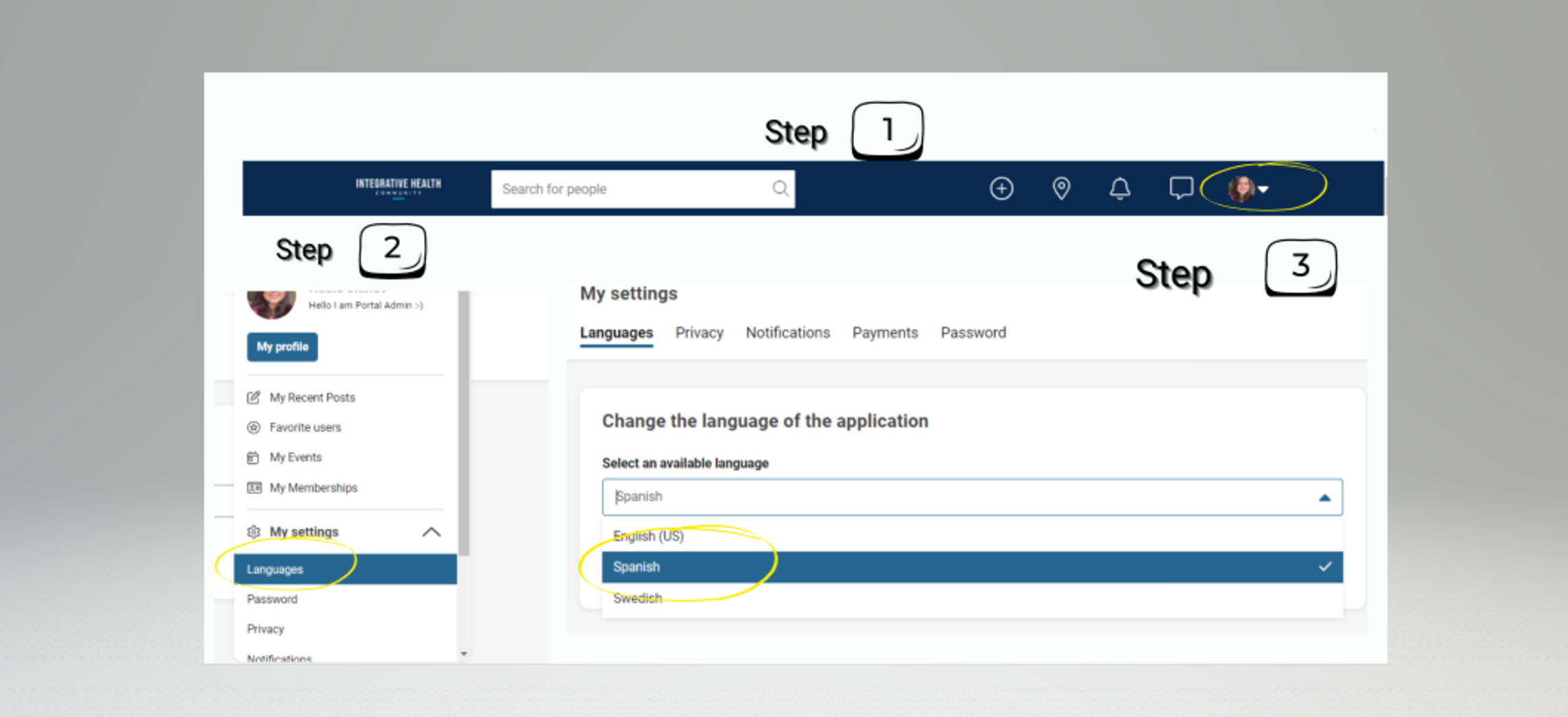
♦ If you would like to activate the Spanish language option, simply follow these easy steps:
Step 1: Go to the Settings menu On the top right corner of the screen, you will see a gear icon. Click on it to open the Settings menu.
Step 2: Choose the Language option From the Settings menu, select the Language option. This will open a dropdown menu with several language options to choose from.
Step 3: Select Spanish Choose "Spanish" from the dropdown menu. Once you have selected this option, the language of the entire website will change to Spanish.
Enjoy the Portal in Spanish! Now that you have selected Spanish as your preferred language, you can access all of our articles, tools, and resources in Spanish.
If you have any questions or concerns about activating the Spanish language option, please feel free to contact our support team. We are always here to help you make the most of our platform and resources.